AI Hairstyle & Hair Cut Editor
- 3.9
- Rating
- 10.00K
- Installs
- Free
- Price

 Analysis by App-foxy
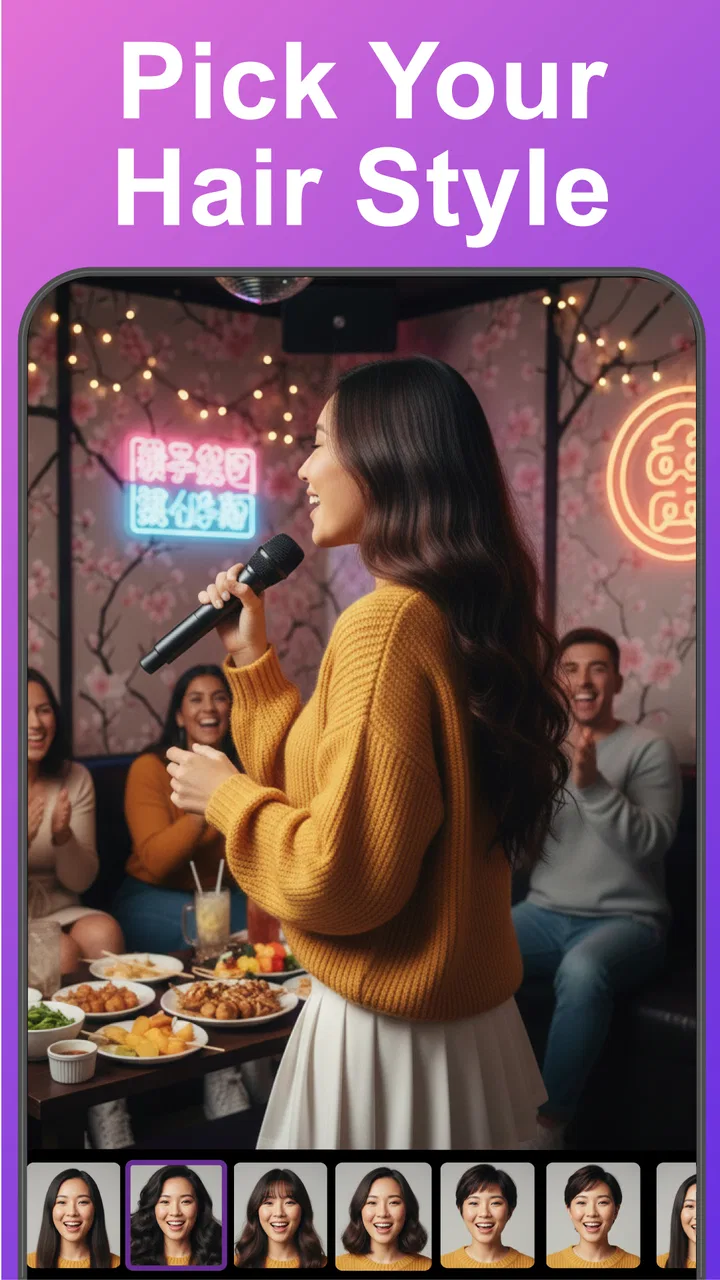
I tried AI Hairstyle & Hair Cut Editor as a practical way to preview a different look before making a real appointment. My starting point was simple: I wanted to see whether a shorter cut, a new fringe, or a different color would suit my face without relying on imagination alone. The app sits in the beauty category, is made by UpName, and focuses on editing a personal photo with AI hairstyle ideas rather than teaching hair care or replacing a salon consultation.
That distinction matters. This is not the kind of tool I would use to decide the exact technical details of a haircut. I see it more as a visual conversation starter. It can help me narrow down a direction, compare a few moods, and show someone else what I mean when words such as “soft bangs” or “short pixie” feel too vague. The free entry point makes it easy to test, although optional purchases range from $0.99 to $99.99 per item, so I would pay attention before confirming anything inside the app.
From an ordinary photo to a hairstyle shortlist
I find it useful to treat the first preview as a starting point, not a verdict: a small shortlist makes it easier to compare the overall shape and explain what catches my eye. Next, I’ll look at how the process holds up when I try several options in one sitting, and where a little restraint can make those comparisons more meaningful.
You May Also Like

 AccuWeather: Weather Radar
AccuWeather Review: A Quick, Clear Forecast for Everyday Decisions
For everyday plans, the best forecast is the one you can understand quickly. AccuWeather makes rain timing, radar, and local conditions easy to act on, with a few trade-offs.

 Hill Climb Racing
Why Hill Climb Racing Still Turns Crashes Into One More Run
A tiny car, a bumpy hill and one more upgrade: Hill Climb Racing keeps resurfacing because its simple chaos makes every near-miss feel personal.

 AliExpress - Shopping App
AliExpress Makes Global Shopping Feel Personal, but Shoppers Bear the Risk
AliExpress turns a global marketplace into a pocket-sized discovery engine. Its reach is useful, its shopping loop compelling, and its trade-offs easy to miss.

 Lords Mobile: Kingdom Wars
Lords Mobile Is a Kingdom-Building Routine, Not a Quick Match
A case-by-case verdict on the building, battles, device demands, and social commitments that make Lords Mobile rewarding for some players and exhausting for others.

 PDF Scanner app - TapScanner
TapScanner Makes Paperwork Easier to Capture, Check, and Share
TapScanner makes scanning with a phone feel less like a rescue operation and more like a dependable step in getting work done. Its capture tools are useful, though not flawless.

 Block Blast!
 Shows How Much a Puzzle Game Can Leave Out
A quiet grid game shows why puzzle players increasingly value instant clarity, repeatable skill and low-pressure play—and where the genre still needs to catch up.
More From Our News Desk
View All News


Starting with the right image
The quality of the starting photo has a bigger effect on the experience than I expected. A clear, front-facing image with the hair visible gives the editor more useful material to work with. A dark room, a tilted head, sunglasses, heavy filters, or hair covering much of the face can make the preview less convincing. I would not begin with a carefully posed social-media picture. A simple, recent portrait is usually more useful because the goal is to judge a possible everyday look, not to create a dramatic profile image.
My first practical tip is to take several photos before opening the editor: one facing forward, one with a slight turn, and one showing the current hairline. That creates a better basis for comparing styles later. It also prevents a common mistake with AI beauty tools: choosing the most flattering image rather than the image that most accurately represents the change I am considering.
The app is aimed at Everyone, which makes its basic concept approachable for casual experimentation. It runs on operating system version 9 or later, and the current version is 3.02. Those details are useful if the app does not appear compatible with an older phone. On a supported device, the main challenge is less about learning complicated controls and more about preparing an image that gives the editor a fair chance.
Choosing a direction instead of chasing random effects
Once I have a suitable portrait, I would start with one clear question. Do I want to see a shorter silhouette, test a color family, understand how bangs might frame my forehead, or compare a braid with my current style? The available focus areas include cuts, shades, pixie looks, braids, and bangs, so there is enough variety to explore without opening the app with no plan at all.
That approach makes the results easier to judge. If I apply a new cut, a strong color, and a completely different texture at the same time, I may like the image without knowing which change actually works. A better workflow is to hold two things steady and change one major element. For example, I might compare my current length with a pixie shape first, then test a darker shade on the version I prefer. This turns the app into a decision aid instead of a gallery of disconnected effects.
I also found it useful to keep a realistic reference in mind. A generated hairstyle can look appealing because it is polished, symmetrical, and carefully framed. That does not automatically mean the same result will be easy to maintain. I treat the preview as an answer to “Could this general direction suit me?” rather than “Will my hair look exactly like this every morning?”
Reading the preview with a critical eye
The most valuable part of the process is not simply producing an image. It is learning how to inspect it. I look first at the outline around the face, then at the way the hair seems to sit near the forehead, cheeks, and neck. If a style changes the apparent balance of my features, that is useful information even when the strands themselves are not perfectly natural.
Color previews need a separate kind of caution. A shade can look attractive because it changes the overall mood of the photograph, but the screen may not represent how the color behaves under indoor light, sunlight, or different clothing. I would use the app to compare broad directions such as warmer or cooler, lighter or deeper, rather than treating one exact digital shade as a promise from a colorist.
With bangs, I pay attention to whether the simulated fringe appears to follow the forehead naturally. With braids, I look at the transition between the hair near the ears and the braid itself. With very short cuts, I check the shape at the sides and back, because a front-facing image can hide the parts that matter most in a real haircut. These checks are small, but they stop the most attractive preview from automatically becoming the best choice.
Creating a useful handoff for another person
The app becomes more useful when I move the result out of the private experiment and into a real conversation. If I am considering a salon visit, I would show the image to the stylist together with a sentence explaining what I actually want to preserve. For example, I might say that I like the shorter outline but want more length around the ears, or that I like the color direction but do not want the same level of brightness.
This is an important handoff because a generated image can communicate shape and mood quickly, while a professional can translate that visual idea into something compatible with hair texture, density, growth patterns, and maintenance time. I would not hand over the image silently and expect it to function as an exact specification. The better use is to point at the parts that appeal to me and the parts I am unsure about.
There is another useful handoff: sharing a small set of alternatives with a trusted friend. I would choose perhaps one conservative option, one noticeable change, and one color experiment. That makes feedback more focused than sending a large collection of random edits. It also helps reveal whether I am responding to the hairstyle itself or simply to a more flattering pose and lighting setup.
When the result is genuinely helpful
In everyday use, I can imagine opening the editor before booking an appointment after months of wearing the same style. I might have a lunch break, take a straightforward portrait, and test a few versions of a shorter cut. Instead of telling the stylist “I want something different,” I can arrive with a clearer idea: keep the general face framing, remove bulk at the sides, and explore a softer fringe. The app does not make the appointment decision for me, but it improves the language I bring to it.
It is also useful for low-risk experimentation. Someone who is nervous about bangs can see whether the overall framing feels appealing before making a temporary commitment. Someone considering a pixie cut can compare the visual impact with their current length. Someone who changes hair color often can use the editor to organize possibilities before spending money or time on a salon service.
The result is strongest when I judge it as a shortlist. I am not looking for a flawless digital twin. I am looking for two or three directions that deserve a more grounded discussion. That is where the app earns its place among beauty tools: it shortens the distance between an abstract idea and a visible reference.
Where the workflow breaks down
The first weak point is the gap between a front-facing preview and a real three-dimensional haircut. A single image cannot show every angle, how the style moves, or how it behaves after sleeping, washing, or drying. This is especially important for short cuts, layered shapes, and styles whose appeal depends on the back or sides. If those details are central to my decision, I would prefer a professional assessment or a more comprehensive consultation.
The second weak point is texture. Straight, wavy, curly, and tightly coiled hair do not respond to the same cut in the same way. An AI preview may suggest a shape without fully communicating the work needed to create it on my own hair. I would be cautious about using a result as a maintenance forecast. A stylist who can examine the actual texture remains the better source for questions about styling time and daily effort.
Color is another place where expectations can drift. A preview may help me decide whether I like the idea of a warmer brown or a brighter shade, but it cannot replace a discussion about the starting color and the process required to reach the target. If my hair has previous color, uneven areas, or damage, the practical route may be very different from the image. The app is best used before that conversation, not instead of it.
There is also a financial friction point. The app is free to start, but it includes in-app purchases, with individual items priced from $0.99 up to $99.99. I would explore the basic experience first and read each purchase screen carefully. A person who only wants a quick visual test may find a paid option difficult to justify, while someone using the editor repeatedly for planning may see more value in expanded access. The important thing is not to assume that every attractive result belongs to the free experience.
How it compares with familiar alternatives
Compared with searching ordinary hairstyle photos, this editor has one obvious advantage: the reference is connected to my own face. A model’s haircut can be inspiring, but it may not answer the personal question I actually have. Seeing a style placed into my portrait gives me a quicker sense of proportion and mood, even if the simulation is imperfect.
Compared with a salon consultation, the app is faster, cheaper to begin with, and less intimidating for early exploration. I can test an idea privately before explaining it to anyone. The salon is still better for feasibility, technique, upkeep, and a final decision. I would use the app to prepare for that conversation, not to eliminate it.
Compared with a conventional photo editor, the appeal here is the hairstyle focus. Manual editing can be more controllable when I want to adjust small details, but it also demands more patience and skill. This app is more convenient when I want to ask, “What might I look like with this kind of cut or color?” The trade-off is that convenience can come with less precision and less control over individual strands or angles.
Who should try it and who should skip it
I would recommend it to people who are undecided, curious about a visible change, or preparing for a haircut conversation. It is particularly suitable for someone who needs a visual prompt before committing to bangs, a pixie direction, a braid style, or a new shade. It can also help a friend or family member understand the kind of look I am considering without requiring a long description.
I would be more cautious if I needed an exact technical preview, a reliable view of every angle, or a precise prediction of color results. People making a major change because of a specific hair concern should also keep their expectations grounded. In those situations, a stylist’s hands-on judgment is more important than an attractive generated image.
The app has a modest but meaningful public footprint, with over 10 thousand installs and a 3.9 average from 29 ratings. I read that as a sign of a useful concept that still deserves realistic expectations rather than unquestioning trust. The six written reviews are not enough for me to treat the experience as universally consistent, so I would judge it on my own phone, with my own photo, before spending on optional items.
My final take after following the full workflow
After moving from an ordinary portrait to a small set of possible looks, then using those images as conversation material, I found the app most valuable as a first step. It helps turn hesitation into something I can inspect. The best outcome is not necessarily a dramatic transformation; sometimes it is realizing that I prefer a softer change, a different fringe shape, or my current length with a new color direction.
My main advice is to use the preview as a question, not a guarantee. Start with a clear photo, change one major feature at a time, compare the result with realistic references, and take the strongest option to a stylist or someone whose judgment you trust. Keep the limitations of a single image in mind, especially for texture, maintenance, and hidden angles.
For a free beauty app from UpName, AI Hairstyle & Hair Cut Editor offers a practical way to explore hair ideas before taking a real-world step. I would install it when I feel stuck between several possibilities, but I would skip it if I expected salon-level accuracy or a complete replacement for professional advice. Used with that boundary, it is a convenient visual planning tool rather than an overpromised makeover machine.
FAQs for AI Hairstyle & Hair Cut Editor
01What features does the AI Hairstyle & Hair Cut Editor offer?
The AI Hairstyle & Hair Cut Editor provides a variety of features including virtual try-ons for different hairstyles and haircuts, color change options, and personalized recommendations based on your face shape. The app uses advanced AI technology to ensure realistic transformations, making it easier to visualize potential changes before committing.
02Is the AI Hairstyle & Hair Cut Editor easy to use for beginners?
Yes, the app is designed with user-friendly navigation and intuitive controls that cater to beginners. With straightforward instructions and a clean interface, users can easily upload their photos and experiment with various hairstyles and colors without any technical expertise.
03Does the app require an internet connection to function?
While some features of the AI Hairstyle & Hair Cut Editor can be used offline, an internet connection is necessary for downloading new styles, accessing updates, and using AI-driven recommendations. Offline use may limit access to the full range of features and real-time processing.
04Can I save and share my hairstyle edits with others?
Absolutely! The app allows users to save their edited images directly to their devices. Additionally, it offers easy sharing options to post your new looks on social media platforms or send them via messaging apps, making it convenient to get feedback from friends and family.
05Are there any in-app purchases or subscriptions required?
The AI Hairstyle & Hair Cut Editor is free to download with basic features available at no cost. However, it offers in-app purchases and subscription plans for access to premium styles, exclusive content, and ad-free experiences. These options provide enhanced functionality for users seeking more extensive customization.
Pros
- Extensive hairstyle options.
- User-friendly interface.
- Realistic photo editing.
- Quick processing time.
- Frequent updates with new styles.
Cons
- Limited free features.
- Occasional app crashes.
- In-app purchases required.
- Requires internet connection.
- Ads can be intrusive.

AI Hairstyle & Hair Cut Editor
Gallery